A debt plan without a budget is just a hope. A budget without a debt plan is just a snapshot. This spreadsheet puts both on the same page. In this sample household, four debts total $16,300, minimums add up to $593, and a careful look at the monthly budget produces $327 of extra payment—bringing the total monthly outlay to $920. I ran the same numbers through our homepage debt payoff calculator starting in April 2026: the plan reaches zero in October 2028, 31 months, with $4,224.45 in total interest under avalanche.
A good budget and debt payoff spreadsheet does one job that a debt-only tracker cannot: it proves whether the extra payment is real. While any card carries a balance, you lose the grace period on new purchases—interest accrues from the transaction date, not the due date (CFPB). Without a budget tab, a payoff sheet cannot tell you whether the extra payment is realistic or wish-list fiction.
What The Combined Spreadsheet Needs To Show First
The household here takes home $6,130 per month and carries $29,000 across five debts: a $1,950 Store Card at 29.99%, a $6,850 Rewards Visa at 24.49%, a $3,700 Credit Union Card at 19.90%, a $5,900 personal loan at 11.75%, and a $10,600 used auto loan at 6.39%. Minimum payments total $756. With the current budget, the sheet only supports a safe $315 extra payment, which means a monthly debt outlay of $1,071 and a debt-free month of December 2028. Tighten five spending categories without touching income, and the safe extra rises to $579. Monthly debt outlay becomes $1,335, total interest falls to $3,914.86, and the last payment moves up to April 2028.
That is the first screen a budget and debt payoff spreadsheet should give you: income, living spend, reserve money, safe extra payment, and the payoff result that follows from those numbers. If you still need to choose snowball, avalanche, or a hybrid before you build the budget around it, use the debt payoff strategies guide or run your own balances through the debt payoff calculator page first. This page assumes the order is already set and asks the harder cash-flow question.
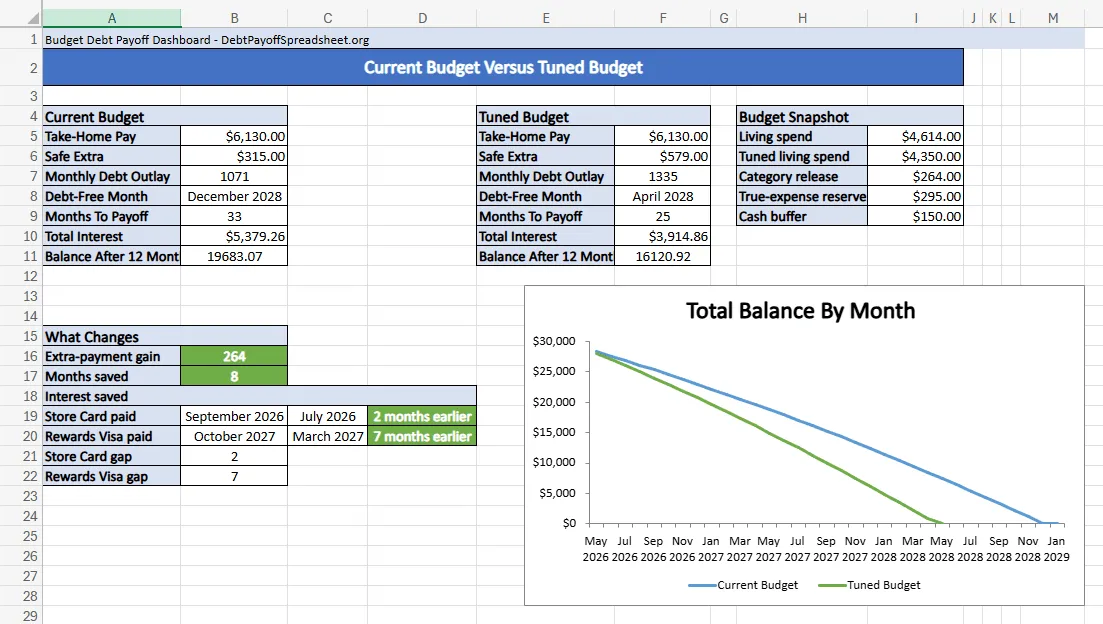
Same Debts, Better Budget
Five debts, April 2026 start, same payoff order in both plans
| Metric | Current budget | Tuned budget |
|---|---|---|
| Safe extra payment | $315.00 | $579.00 |
| Monthly debt outlay | $1,071.00 | $1,335.00 |
| Debt-free month | December 2028 | April 2028 |
| Total interest | $5,379.26 | $3,914.86 |
| Balance after 12 months | $19,683.07 | $16,120.92 |
| Rewards Visa paid | October 2027 | March 2027 |
That March 2027 Visa payoff is where the spreadsheet starts to feel different in real life. The current budget does clear the small Store Card in September 2026, but the tuned version clears it in July 2026 and gets to the expensive Visa seven months sooner. The debt order did not get smarter. The budget simply stopped starving it.
Turn Category Cuts Into One Repeatable Payment
The tuned plan is not built from a heroic month. It is built from five permanent releases that add up to $264: groceries fall by $100, transportation by $55, dining out by $65, subscriptions by $26, and personal and household spending by $18. Those are not glamorous changes, but they are stable.
A budget and debt payoff spreadsheet is a planning file, not a lender agreement. It assumes your rates stay put, your income stays steady, and nobody adds new charges to a card you are trying to pay down. When any of those assumptions break, the payoff schedule drifts.
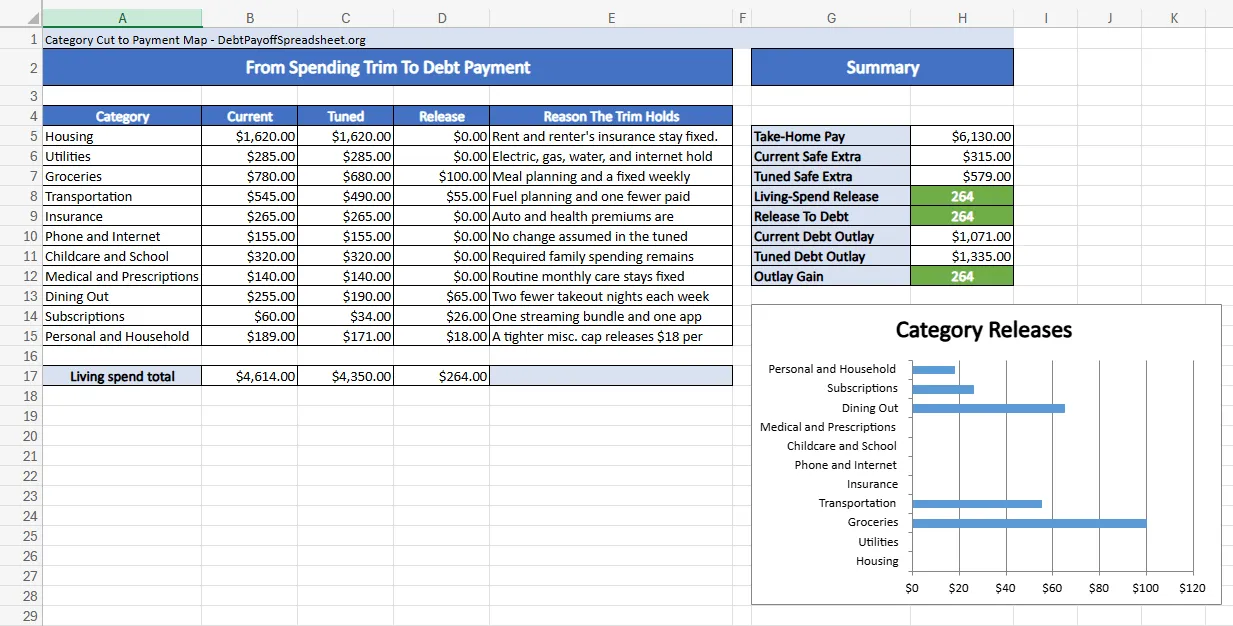
This is also where a combined sheet beats a debt-only tracker. A debt tracker will happily accept a bigger payment and print a prettier payoff month. The budget side forces you to prove the source. If you already trust your budget and only need a tracker, start with the Excel debt payoff spreadsheet or the Google Sheets version. This page is for people who need to prove the extra payment exists before they can believe the payoff date.
Keep True Expenses In The Same File
The reserve line is the part people are most tempted to delete because it makes the payoff month look slower. In this scenario, the tuned plan reserves $295 every month for irregular expenses, or $3,540 over the year from April 2026 through March 2027. Remove that line and the no-reserve version suddenly claims a safe extra payment of $874, a monthly debt outlay of $1,630, and a debt-free month of November 2027. On paper, that is five months faster and $873.34 cheaper than the tuned plan.
The spreadsheet should show why that faster answer is fragile. The annual reserve is not padding. It is covering August 2026 car upkeep, a September insurance true-up, November holiday travel and gifts, January school and clothing costs, February medical and dental bills, and March tags and home upkeep. The CFPB’s budgeting guidance recommends keeping track of what your bills are, when they are due, and using a working budget that pulls spending and due dates together (CFPB). A debt plan that ignores those bills is not more efficient. It is simply late.
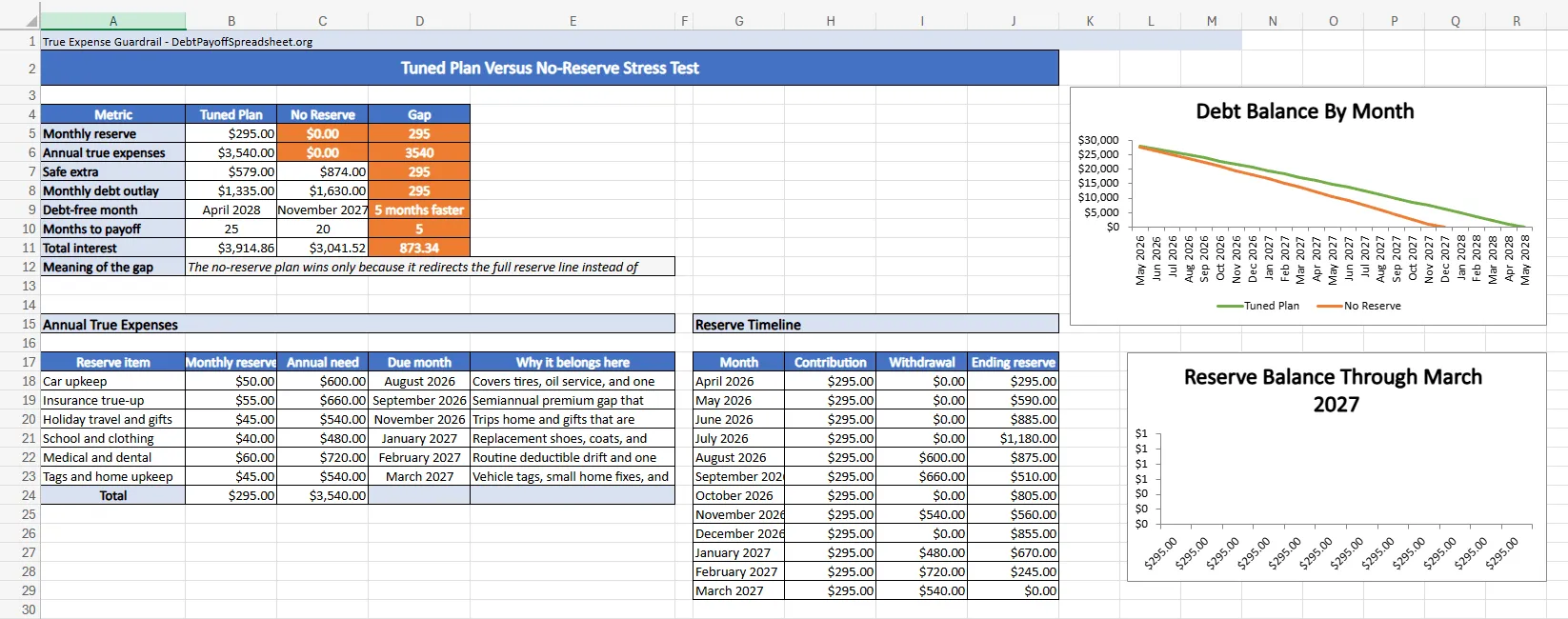
The reserve timeline makes the point better than a lecture does. By the time the August 2026 car bill lands, the reserve has built to $1,475 and can cover a $600 hit. After the September insurance true-up, the balance is still $510. The no-reserve version reaches debt-free sooner only because it spends that same money before those bills arrive. If you then put the irregular costs back on a card, the debt-free month you were chasing was never real.
Where A Combined Spreadsheet Falls Short
A budget and debt payoff spreadsheet is the right tool when the real problem is making the monthly payment sustainable. It is not enough on its own when the debt terms are changing underneath you. Promotional APR deadlines, deferred-interest offers, and balance transfer fees belong in a more specialized model. If your debt is mostly revolving card balances with shifting terms, the credit card debt payoff guide covers promo deadlines and rate changes in more detail. And if you want to compress the timeline further with a temporary sprint or lump-sum payment, the how to pay off debt fast guide shows how a short push cuts months off the tail.
Budget and Debt Payoff Spreadsheet FAQ
What should a budget and debt payoff planner in Excel include?
It should show take-home pay, spending categories, true-expense reserves, each debt's balance, APR, minimum payment, and one safe extra-payment number that survives the calendar. The workbook downloads on this page are built around that exact structure, so you can see the budget and the payoff plan in the same file instead of managing them in separate tools.
Is there a free debt payoff spreadsheet with a built-in budget?
Yes. Our website provides free workbook downloads that combine budget tracking, true-expense reserves, and debt payoff planning in one file. That makes this article the better fit for readers who need a budget and debt payoff spreadsheet, not just a method-specific worksheet that tracks balances after the payment amount is already decided.
How can I use this worksheet to find my extra debt payment?
Start with net income, subtract living expenses, subtract debt minimums, keep a small cash buffer, and keep a monthly reserve for predictable irregular bills. In the worked example on this page, that process shows why the current budget only supports a $315 extra payment, while the tuned version supports $579 without pretending the annual bills disappeared.
When should I use a budget and debt payoff spreadsheet instead of a debt payoff calculator?
Use this page when the main problem is not choosing snowball versus avalanche, but proving what payment the budget can actually sustain. The homepage calculator is the faster tool for payoff-month comparisons, while the Excel, Google Sheets, printable, snowball, and avalanche pages are better once the method is already chosen and a narrower tracker makes more sense.

Related Guides and Resources
- Debt Payoff Spreadsheet Excel: Free Workbook With Dashboard and Strategy Tabs
- Debt Payoff Spreadsheet Google Sheets: Shared Tracker With Dashboard and Check-In Log
- How to Pay Off Debt Fast: A 10-Month Sprint Plan That Cuts 11 Months Off Payoff
- Debt Payoff Spreadsheet Printable: Free Print-Ready Tracker With Monthly Check-In Sheets