You are sending $1,174 out every month and still wondering if the plan is right. That doubt usually is not about effort—it is about order. I ran this exact five-debt mix through the homepage debt payoff calculator starting in April 2026, and the tradeoff became concrete: snowball wipes out one account fast, but avalanche reaches zero 2 months sooner and cuts interest by $1,402.32.
A calculator earns its keep when it turns a vague plan into three concrete numbers: your debt-free month, your total interest cost, and the first point where momentum gets easier. With the Federal Reserve’s January 8, 2026 G.19 release reporting $1.3139 trillion in seasonally adjusted revolving consumer credit outstanding as of November 2025, payoff visibility matters more than ever (Federal Reserve).
What The Calculator Should Show You
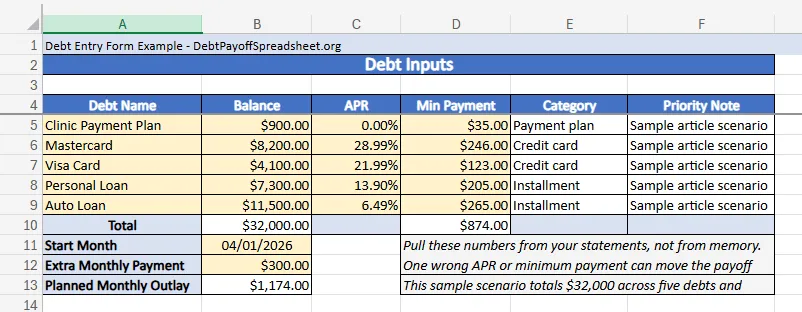
For this article, the sample household starts with $32,000 across five debts: a $900 clinic payment plan at 0.00%, an $8,200 Mastercard at 28.99%, a $4,100 Visa card at 21.99%, a $7,300 personal loan at 13.90%, and an $11,500 auto loan at 6.49%. The required minimums add up to $874, and the household can keep up with one extra payment of $300 every month. Those are the only inputs that matter at the start.
A good debt payoff calculator also forces you to respect the details people gloss over. APR—the yearly rate used to express borrowing costs on a credit card—is why two balances that look similar on paper can behave very differently once interest starts compounding (CFPB). And paying only the minimum can stretch payoff into years, even when the balance looks manageable on a statement (CFPB). A calculator that ignores APR or treats minimums as an afterthought is not helping you make a real decision.
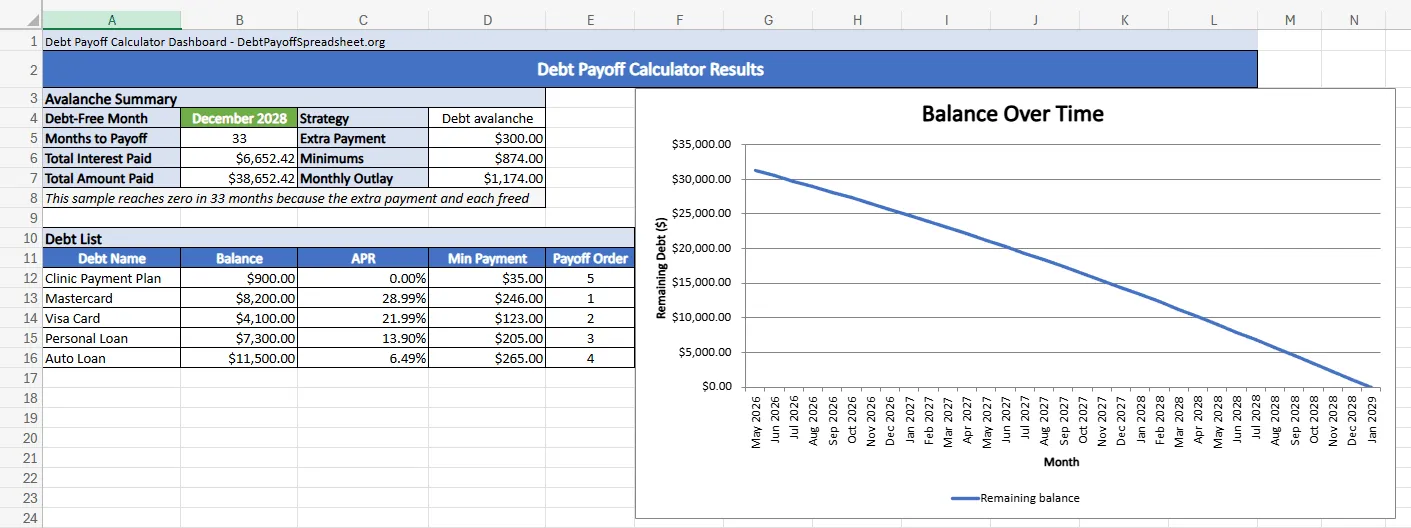
In this scenario, avalanche reaches a debt-free month of December 2028, takes 33 months, and produces $6,652.42 in interest. Total paid comes to $38,652.42. That is specific enough to budget around before you promise yourself anything.
Same Debts, Different Order
Snowball sends the extra payment to the smallest balance first. Avalanche sends it to the highest APR first. Same debts. Same monthly outlay. Different path.
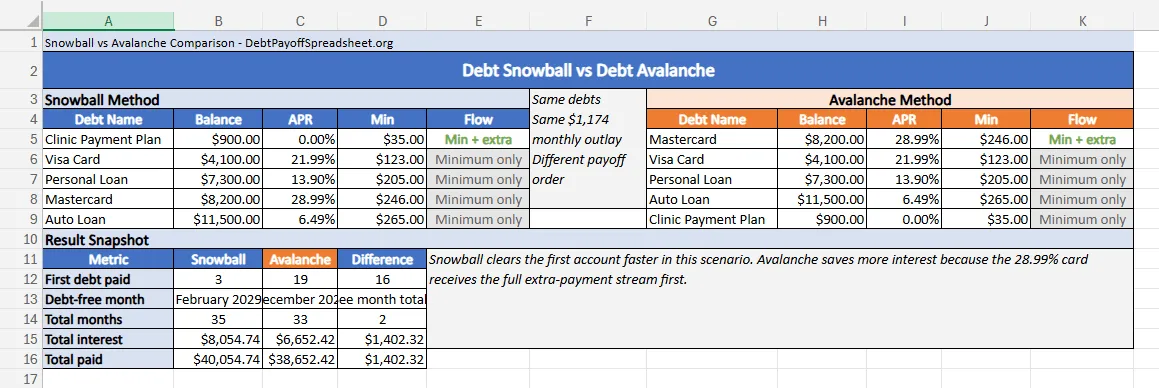
Sample Result: Snowball vs Avalanche
Same five debts, same April 2026 start, same $300 extra payment
| Metric | Snowball | Avalanche |
|---|---|---|
| First debt paid | 3 months | 19 months |
| Debt-free month | February 2029 | December 2028 |
| Total months | 35 | 33 |
| Total interest | $8,054.74 | $6,652.42 |
| Total paid | $40,054.74 | $38,652.42 |
That 16-month gap to the first payoff is the whole case for snowball in this example. If you need one balance gone fast so the plan starts to feel real, snowball gives you that in June 2026 by erasing the 0.00% clinic payment plan. The cost is not abstract. By sending the first extra dollars to a zero-interest balance, the household spends 2 extra months in debt and pays $1,402.32 more in interest before the last payment clears.
Avalanche wins here because the most expensive balance is also large. The $8,200 Mastercard at 28.99% keeps charging hard while snowball is busy elsewhere. That logic is close to the way excess credit-card payments are generally applied under Regulation Z, where amounts above the minimum go first to the highest APR balance (CFPB, Regulation Z commentary). For the broader framework behind that choice, see our debt payoff strategies guide. For a method-specific tracking file, the debt avalanche spreadsheet and debt snowball spreadsheet extend the same logic into standalone worksheets.
What To Enter Before You Trust The Result
A calculator is only as good as the numbers you feed it. Pull the current statement balance, the live APR, and the required minimum from each account. Then decide on one extra-payment amount you can repeat without borrowing again next month. If that extra payment depends on one-time income, treat it as a bonus, not as your base plan.
This is also where real-life friction shows up. A fixed-rate auto loan behaves predictably. Credit cards do not always stay put. If a card is on a promotional APR or a variable rate, the ranking can flip later, which means your first run through the calculator may be outdated faster than you expect. Readers focused mostly on revolving balances should also check out our credit card debt payoff guide before committing to one static order.
Where Calculators Break Down
A debt payoff calculator is not a settlement tool, a tax guide, or a hardship-plan simulator. It assumes you keep making the listed minimum payments, stop adding new debt, and keep the extra payment available every month.
The biggest edge case in this sample is the 0.00% clinic payment plan. Snowball loves it because it is small. Avalanche ignores it because it is cheap. Neither answer is wrong. The calculator simply shows you what that preference costs. In this case, choosing the quick win pushes payoff from December 2028 to February 2029. That is exactly the kind of tradeoff you want to see before emotion locks in the plan.
The tool also becomes less reliable when minimums are unstable. Some card issuers change the minimum formula as balances fall, and promotional offers can end before the debt is gone. Treat the calculator as a live planning tool. Update it after every statement cycle, and rerun it any time a rate or required payment changes.
Use The Result, Then Keep Tracking
The best use of a debt payoff calculator is choosing a plan you can actually fund next month, and the month after that. In this example, avalanche is the stronger answer because it cuts interest and finishes faster. If your own version of this scenario includes a balance that you need gone early for discipline reasons, snowball can still be the better fit. The calculator’s job is to make that tradeoff visible.
A manual tracker can help once you have the answer. If you want a downloadable file after you settle on a method, move into a spreadsheet and keep updating it every month instead of guessing from memory. If cash flow is the bigger issue than payoff order, pair the calculator result with a budget review so the extra payment is something you can actually sustain.
Debt Payoff Calculator FAQ
Can I use a debt payoff calculator in Excel?
Yes. An Excel version works well if it captures the same core inputs a web calculator uses: current balance, APR, minimum payment, start month, and any extra payment you can make every month. The main risk is using a static spreadsheet that does not roll freed minimum payments forward correctly.
What is the difference between a debt snowball calculator and a debt avalanche calculator?
A debt snowball calculator sends extra money to the smallest balance first, while a debt avalanche calculator sends it to the highest APR first. In the sample scenario in this article, snowball clears one account much sooner, but avalanche still gets the household debt-free faster and with less interest paid.
Is there a free debt payoff spreadsheet if I do not want an app?
Yes. A free debt payoff spreadsheet can handle the same job as a web calculator if the formulas are solid and the inputs stay current. It is a good fit for readers who want a local copy or a printable plan.
Does a credit card payoff spreadsheet work for loans too?
Usually, yes. If the spreadsheet lets you enter each balance, APR, and minimum payment separately, it can model credit cards, personal loans, auto loans, and payment plans in one file. The exception is debt with special rules, such as promotional APRs that expire or settlements that change the payment structure.