When a debt plan belongs to two people instead of one laptop, the update cycle matters as much as the payoff order. In this sample household, five debts add up to $30,100, required minimums total $858, and the couple adds $350 each month for a $1,208 outlay. I ran those balances through our debt payoff calculator starting in April 2026 and the tradeoff came back narrow: avalanche and snowball both reach August 2028, but avalanche trims $411.10 of interest while snowball closes the first account 9 months earlier.
One person in this scenario handles autopay. The other drops in the extra payments and checks progress after each statement closes. That is where a debt payoff spreadsheet in Google Sheets starts making more sense than a private desktop file. Google’s own Sheets guidance highlights direct sharing, real-time collaboration, automatic saving to Drive, and version history as core differences from an Excel-only workflow (Google Docs Editors Help). The debt side is large enough that staying synced matters: the Federal Reserve’s March 6, 2026 G.19 release put revolving consumer credit outstanding at $1.329 trillion in January 2026 (Federal Reserve).
Use Google Sheets When The Update Cycle Matters
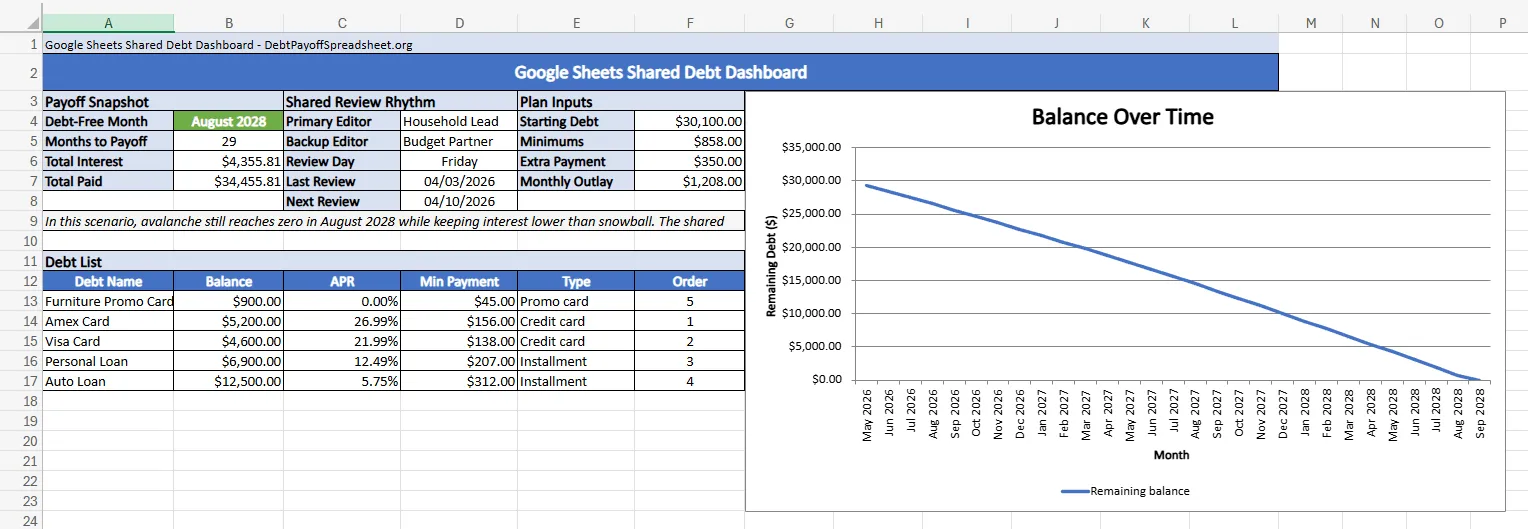
The shared dashboard on this page is built around one habit: pull the statements, update the balances, confirm the next review date, and move on. On the default avalanche plan, the dashboard shows a debt-free month of August 2028, 29 months to payoff, $4,355.81 in total interest, and $34,455.81 in total paid. It also keeps the handoff clear with a primary editor, a backup editor, and a fixed Friday review cadence on the same screen.
That sounds minor until rates or balances move. While any card carries a balance you lose the grace period on new purchases, which means interest starts from the transaction date instead of the statement due date (CFPB). If you only need an offline file you audit alone, the Excel debt payoff spreadsheet is a cleaner option. For a live file that both people open on a laptop or phone, Sheets makes more sense.
The Monthly Check-In Is Where Shared Sheets Win
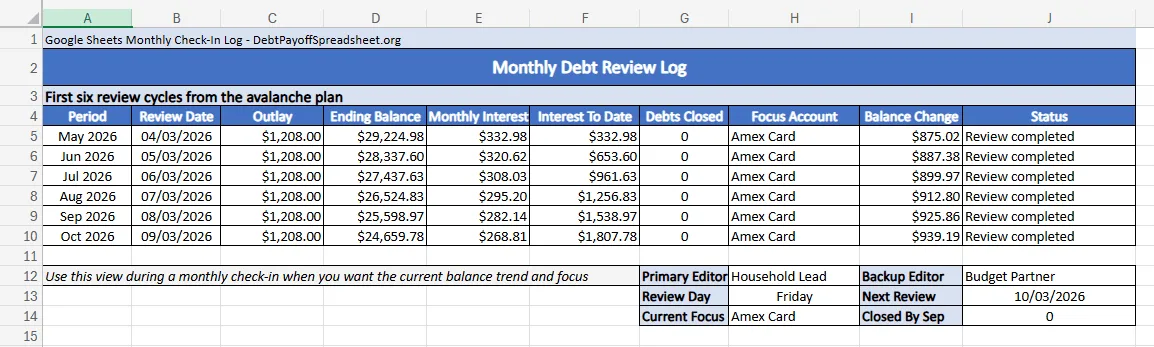
A free debt payoff spreadsheet template is only useful if it makes monthly reviews easier, not prettier. In the first six review cycles of this sample, the ending balance falls from $29,224.98 in April 2026 to $24,659.78 in September 2026. Interest paid to date reaches $1,807.78 by the sixth check-in, and the Amex stays the focus account the whole time because its 26.99% APR keeps it at the top of the payoff order.
That kind of log keeps both people grounded in the same trend instead of arguing from memory about whether the plan is working. For a couple, the debt-to-income ratio—monthly debt payments divided by gross monthly income—is a fast check on whether the extra payment is realistic (CFPB). If you would rather build the tabs and formulas from scratch, our how to create a debt payoff spreadsheet guide walks through the structure. Otherwise, the shared log here does the harder part by putting the current balance trend and next focus debt on one page.
When Two Valid Methods Finish In The Same Month
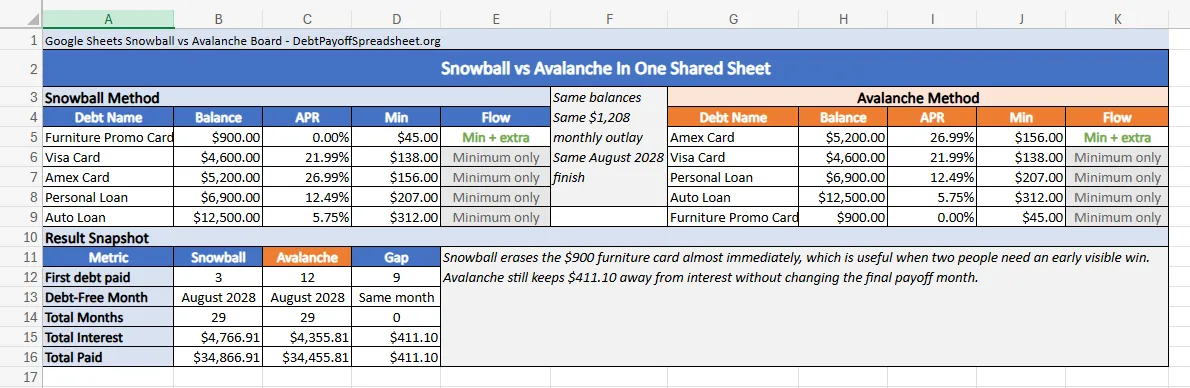
This debt mix does not have one emotionally obvious winner. Snowball clears the $900 Furniture Promo Card in June 2026. Avalanche does not eliminate a full balance until March 2027, when the $5,200 Amex finally hits zero. In plenty of households, that 9-month gap in visible progress is the whole reason snowball feels easier to stick with.
The math still leans avalanche, just not by much. Both methods finish in August 2028 after 29 months, but snowball pays $4,766.91 in interest while avalanche pays $4,355.81. The cost of that earlier win is $411.10—not extra years in debt. For the broader rules behind that choice, the debt payoff strategies guide covers when the motivation-first answer is worth it and when the interest gap gets too large to ignore.
The Edge Case In This Sheet Is The 0% Promo Balance
The Furniture Promo Card is the balance most likely to change the plan later. Under avalanche, that balance can sit open until November 2027 because the higher-APR Amex, Visa, and personal loan absorb the extra payment first. If your real version of this debt is a deferred-interest offer instead of a clean 0% promotional rate, that order can become wrong very quickly.
The CFPB warns that minimum payments usually will not clear a deferred-interest purchase before the promotional period ends (CFPB). If most of your balances are revolving accounts with shifting terms, the credit card debt payoff guide addresses promo deadlines and card-specific tradeoffs directly. A spreadsheet can diagnose the plan, but it cannot rescue a payoff order that nobody has checked in months.
Google Sheets Debt Payoff Spreadsheet FAQ
Is there a free debt payoff spreadsheet I can use in Google Sheets?
Yes. The spreadsheet on our homepage can be downloaded and used in Google Sheets, and it works well when you keep each balance, APR, minimum payment, and one repeatable extra payment amount current. The bigger issue is staying on top of statement updates, not whether the template itself is free.
Will a credit card payoff spreadsheet in Google Sheets also handle loans?
Usually, yes. The homepage spreadsheet can track credit cards, personal loans, auto loans, and payment plans as long as each debt has its own balance, APR, and minimum payment entry. The exception is debt with special rules, such as deferred-interest promotions or settlement terms that change the payment structure.
Should I use a snowball payoff spreadsheet or an avalanche debt spreadsheet?
Use snowball when the early account closure is the part most likely to keep you engaged, and use avalanche when lowering interest cost is the main goal. The homepage spreadsheet can model both methods, and in this article's sample case the real tradeoff is a nine-month earlier first payoff versus $411.10 in extra interest because both methods still finish in the same month.
Do I need an Excel debt payoff planner, or can Google Sheets do the same job?
Google Sheets can handle the same debt payoff math if the formulas are solid, and the homepage spreadsheet can be used in either Google Sheets or Excel. Excel is usually better for readers who want a local file they control alone, while Google Sheets is better when two people need the same tracker, the same review notes, and the same version of the plan.

Related Guides and Resources
- Debt Snowball Spreadsheet: Free Tracker With Payoff Schedule and Win Ladder
- Debt Avalanche Spreadsheet: Free Tracker For Rate-First Debt Payoff
- Budget and Debt Payoff Spreadsheet: One File for Spending, True Expenses, and Debt Targets
- Debt Payoff Spreadsheet Printable: Free Print-Ready Tracker With Monthly Check-In Sheets