An avalanche spreadsheet does one thing well: it puts the most expensive balance in front of you and keeps it there until it is gone. In this sample plan, five debts total $30,318, required minimums add up to $915, and one extra $360 payment turns a November 2028 finish into August 2028 when the order shifts from smallest balance to highest APR. I ran the same mix through our debt payoff calculator to confirm: avalanche saves $2,912.22, but it asks you to wait until October 2027 for the first full payoff.
An avalanche spreadsheet only helps if it keeps the expensive balance visible. Most card issuers calculate interest daily using your average daily balance, so every extra day a high-APR card carries a balance adds real cost (CFPB). The harder part is sitting with an open account count that does not change for months while a 31.99% card keeps billing you.
What A Good Avalanche Spreadsheet Should Show
This scenario starts with a $2,741 Credit Union Loan at 8.99%, a $9,104 Rewards Visa at 31.99%, a $3,494 Store Card at 17.99%, a $7,530 Personal Loan at 13.99%, and a $7,449 Auto Loan at 5.99%. The minimums total $915. Add a repeatable $360 extra payment and the planned monthly outlay becomes $1,275.
That is enough information for an avalanche spreadsheet to give a useful answer. In this exact setup, the rate-first order reaches a debt-free month of August 2028, takes 29 months, and produces $6,116.71 in interest. Total paid comes to $36,434.71. Month-one interest alone is $440.58, which is why a proper workbook should show more than the final payoff date. It should show how much drag you are carrying right now and how much of it is coming from the current target debt.
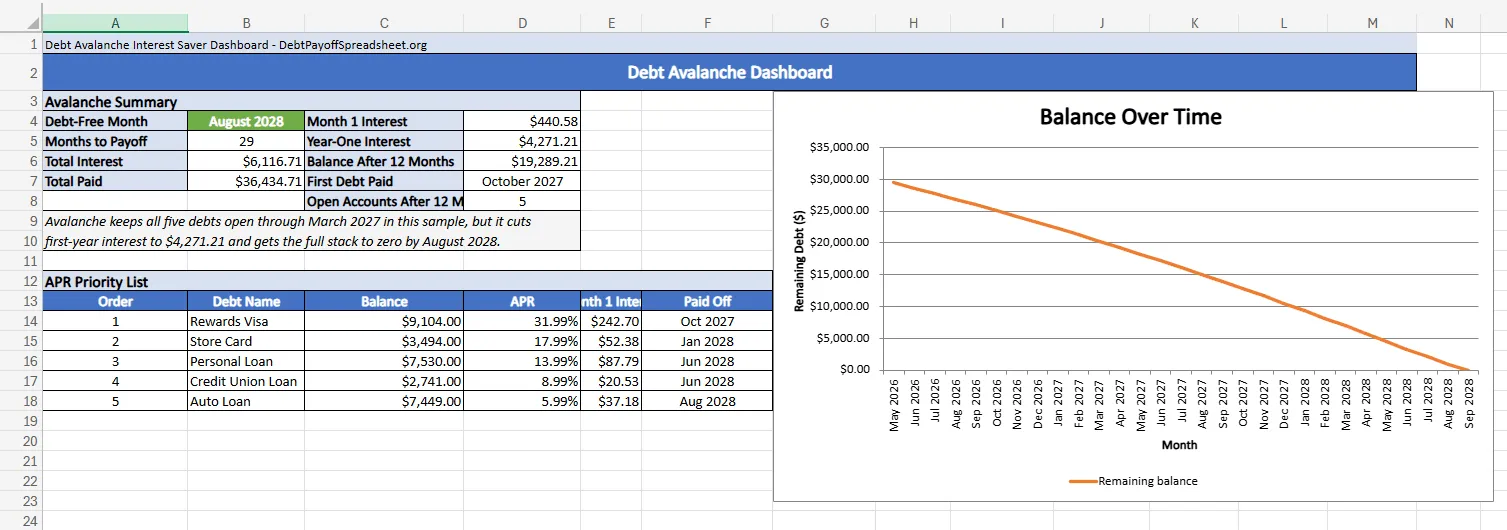
The first-year view matters more than people expect. By March 2027, avalanche still has all five accounts open, which can feel discouraging if you are used to tracking progress by account count. Even so, the remaining balance is already down to $19,289.21. That is the number a rate-first spreadsheet is supposed to keep in front of you.
Why The Highest-APR Balance Changes The Whole Plan
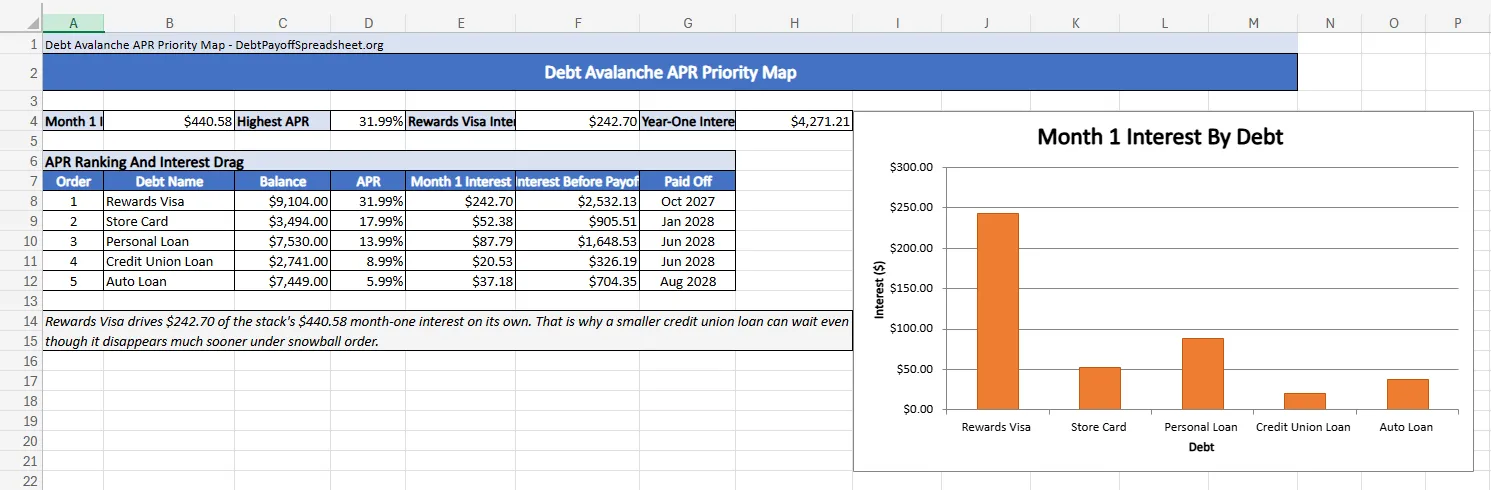
The Rewards Visa is the reason this plan works. In month one, it generates $242.70 of the stack’s $440.58 total interest. The Store Card adds $52.38. The Personal Loan adds $87.79. By contrast, the Auto Loan only adds $37.18 even though its balance is still large. Once you see those numbers lined up, it becomes harder to justify sending the extra payment to the smallest balance just because it is easier to clear.
That is the real use of an avalanche spreadsheet. It gives you a ranked map of where the plan is leaking money. In this sample, the Rewards Visa produces $2,532.13 of interest before it is finally paid off in October 2027. The Auto Loan produces $704.35 before payoff. Both balances matter. They do not cost the same thing to leave alone.
For a general-purpose desktop file rather than an avalanche-specific workbook, start with the Excel debt payoff spreadsheet. For the motivation-first version of the same exercise, the debt snowball spreadsheet tracks the early account closures avalanche is willing to postpone.
The Math Wins Here Even Though The First Win Comes Later
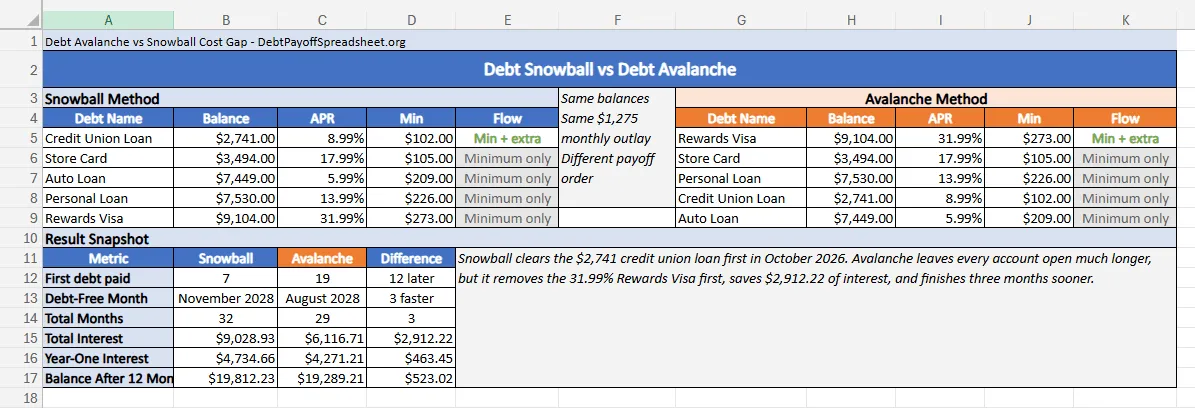
Snowball does what it is supposed to do in this sample. It closes the $2,741 Credit Union Loan in October 2026. Avalanche does not wipe out a full balance until October 2027, when the Rewards Visa finally hits zero. That one-year gap is the whole emotional case against avalanche.
The spreadsheet still tells a cleaner story for rate-first payoff. By the end of the first 12 months, avalanche has paid $4,271.21 of interest while snowball has paid $4,734.66. The remaining balance is $19,289.21 under avalanche versus $19,812.23 under snowball. You are not just waiting longer for the first payoff. You are buying a lower balance path the entire time.
Same Debts, Different Tradeoff
Five debts, April 2026 start, $360 extra payment
| Metric | Snowball | Avalanche |
|---|---|---|
| First debt paid | October 2026 | October 2027 |
| Debt-free month | November 2028 | August 2028 |
| Total months | 32 | 29 |
| Year-one interest | $4,734.66 | $4,271.21 |
| Balance after 12 months | $19,812.23 | $19,289.21 |
| Total interest | $9,028.93 | $6,116.71 |
That tension is normal. Research published through Duke shows that people often prefer paying off smaller debts first even when a higher-interest balance is more expensive to keep around (Duke Scholars). If that is how you stay engaged, read the debt payoff strategies guide to price the motivation benefit before committing.
In this case, the price is clear. Snowball keeps the Rewards Visa open until the very end and adds $2,912.22 of extra interest. Avalanche finishes three months sooner. That is a large enough gap that the spreadsheet is doing more than sorting rows. It is showing you the cost of chasing the quick win first.
When The APR Ranking Shifts Underneath You
An avalanche spreadsheet is a planning model, not a set-it-and-forget-it rule. A variable APR changes with the index rate, and an avalanche order depends entirely on the current ranking of those rates (CFPB). If the top card rate changes, the priority list may need to change with it.
The same problem shows up when the debt itself changes. A new purchase on the target card, a promotional rate that expires, or a minimum payment that gets adjusted can all shift the math. That is why a useful avalanche spreadsheet gets updated after each statement cycle instead of living as a static download on your desktop.
The method also gets shakier when most of the stack is revolving debt and the terms keep moving. In that case, start with the credit card debt payoff guide before you trust a fixed order. The spreadsheet still matters—it just needs fresher inputs than an installment-heavy plan does.
Debt Avalanche Spreadsheet FAQ
Is there a free debt avalanche spreadsheet?
Yes. The spreadsheets on this page are free scenario files, and the homepage payoff spreadsheet can be used for your own balances if you want a more general template. What matters most is not the price. It is whether the file correctly tracks APR, minimum payments, and one repeatable extra payment amount.
Can I use a debt avalanche Excel spreadsheet instead of an app?
Yes, if the workbook has a clear input area and formulas that roll extra payments forward automatically after each payoff. Excel is a good fit when you want an offline file you control, can audit, and can update after each statement closes.
What should a debt avalanche spreadsheet template include?
At minimum, it should list each debt's balance, APR, and minimum payment, sort the debts by highest APR, and show a month-by-month schedule. A stronger template also shows the first-year interest cost and a side-by-side comparison with snowball so you can see what the delayed first payoff is buying you.
Is an avalanche method spreadsheet better than a debt snowball spreadsheet?
It is better when lowering total interest is the main goal and you can stay committed without an early closed account. It is not automatically better for every person. Some people stick with snowball more easily because they see the first payoff sooner, even when the math is worse.

Related Guides and Resources
- Debt Payoff Spreadsheet Google Sheets: Shared Tracker With Dashboard and Check-In Log
- How to Create a Debt Payoff Spreadsheet From Scratch
- Budget and Debt Payoff Spreadsheet: One File for Spending, True Expenses, and Debt Targets
- Debt Payoff Spreadsheet Printable: Free Print-Ready Tracker With Monthly Check-In Sheets