Building a debt payoff spreadsheet from scratch sounds harder than it is. The secret is that you only need three tabs: one source table, one roll-forward schedule, and one strategy-comparison sheet. I set up this five-debt scenario—$28,150 of debt, $785 of required minimums, and a repeatable $300 extra payment—then ran it through the homepage debt payoff calculator to set a baseline: September 2028 under avalanche, October 2028 under snowball. The spreadsheet’s job is to make that tradeoff visible in a file you can audit, not to impress you with tabs.
That restraint matters because the APR column is doing real work. The Federal Reserve’s February 6, 2026 G.19 release listed average credit card plan rates at 20.97% across all accounts and 22.30% on accounts assessed interest in December 2025 (Federal Reserve). If your homemade file treats rate data as optional, it will look organized while still giving you a weak payoff plan.
Build One Source Table Before You Touch The Schedule
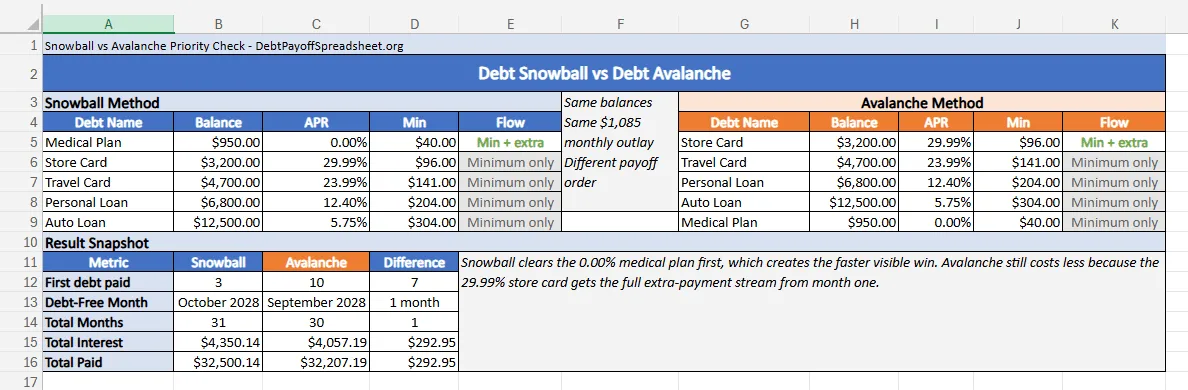
The first sheet should hold the current balance, APR, minimum payment, and debt type for every account you plan to pay down. APR—the cost of credit expressed as a yearly rate—belongs in the same row as the balance from day one, not tucked away in a notes column you forget about (CFPB). In the sample build here, that first table includes a $950 medical plan at 0.00%, a $3,200 store card at 29.99%, a $4,700 travel card at 23.99%, a $6,800 personal loan at 12.40%, and a $12,500 auto loan at 5.75%.
The second thing that source table needs is two rank columns. One ranks by smallest balance for snowball. The other ranks by highest APR for avalanche. That small choice prevents a common spreadsheet failure: building a schedule first, then discovering later that you cannot compare strategies without rewriting half the workbook. In this scenario, the smallest debt is the medical plan, but the highest APR sits on the store card. That difference is the reason the two methods do not behave the same way once the extra payment starts moving.
If you would rather start from a finished file instead of building from scratch, the Excel debt payoff spreadsheet already has this layout offline, and the Google Sheets shared tracker puts it in the browser. If you are building from scratch, though, get this first sheet right before you open a second tab.

Let The Extra Payment Behave Like One Pool
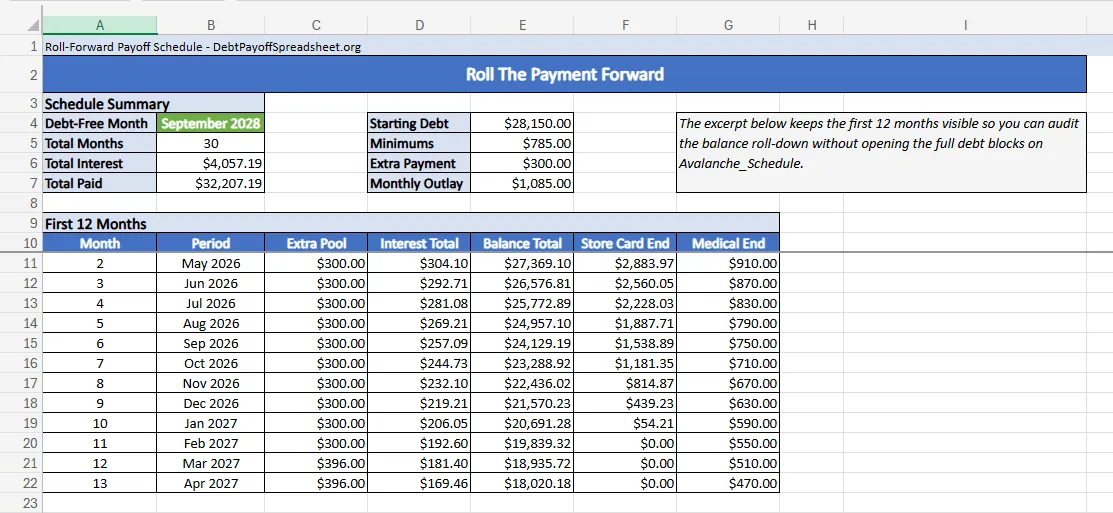
Once the source table is stable, the next tab should be a roll-forward schedule. Each month starts from the prior month’s ending balances. Each open debt gets its required minimum. Then the entire extra-payment pool goes to the current focus debt. When a balance reaches $0.00, its minimum rolls forward into the next month’s extra pool. That is the piece many homemade trackers miss, and it is the difference between a real payoff spreadsheet and a static debt list.
The payoff schedule in this scenario makes that logic easy to see. The workbook starts with a monthly outlay of $1,085. Monthly interest is $304.10 in April 2026, then drops to $169.46 by March 2027. Total balance falls from $28,150.00 to $18,020.18 over that same first-year stretch. The store card hits $0.00 in January 2027, so its $96 minimum joins the extra payment and turns the pool from $300 to $396 in February 2027. That single transition is why the schedule tab matters more than a dashboard at the build stage.
Paying more than the minimum is what actually shortens the plan. Before you set the extra-payment amount, check your debt-to-income ratio—monthly debt payments divided by gross monthly income—to confirm the number is sustainable (CFPB). A good schedule tab translates that rule into a number you can check each month. If the extra-payment pool does not grow after a debt is gone, the workbook is missing the roll-forward logic.
Add One Comparison Tab Before You Commit To A Method
After the source table and the schedule exist, add one strategy tab that reuses the same inputs under snowball and avalanche. This is where a custom spreadsheet stops being a record-keeping file and becomes a decision tool. You do not need a long strategy essay inside the workbook. You need two payoff orders, two totals, and one honest line on what the quick win costs.
For this debt mix, snowball clears the medical plan in June 2026, only 3 months after the April 2026 start. Avalanche does not eliminate a full balance until January 2027, when the store card reaches zero in month 10. That early win is why some readers stick with snowball. The cost in this scenario is smaller than many people expect but still real: snowball finishes in October 2028 after 31 months and pays $4,350.14 of interest, while avalanche finishes in September 2028 after 30 months and pays $4,057.19. The homemade spreadsheet makes the tradeoff plain: a 7-month earlier first payoff for $292.95 of extra interest and one extra month in debt.
Once you know which tradeoff you prefer, the broader debt payoff strategies guide walks through more complex scenarios. Keep the comparison tab in your workbook so you can rerun the choice later if rates or balances move. The structure stays simple because both methods still point back to the same source table.
Know Where The Spreadsheet Stops Matching Real Life
Most custom debt trackers fail in the edge cases, not in the first month. Credit card issuers may calculate interest with a daily periodic rate instead of the clean monthly-rate assumption your schedule uses, which is why your projected interest and the next statement’s interest line will not always match exactly (CFPB). That is not a reason to abandon the spreadsheet. It is a reason to treat it as a planning model and keep the APRs and balances current after each statement closes.
Promotional balances are the other weak spot. A 0% or deferred-interest account can sit harmlessly in the file for months and then become the most urgent balance on the day the terms change. If most of your debt is revolving card debt with changing rates or teaser offers, the credit card debt payoff guide focuses on the issuer behavior that makes a static order stale. Your spreadsheet should still include those balances, but it should also remind you to rerun the plan before the rules reset.
The cleanest custom workbook is the one you can still trust after month six. Build the source table once. Let the schedule and comparison tabs reference it. Update the sheet after the statement cycle, not whenever you remember. That keeps the file small enough to audit and useful enough to guide a real payoff plan.
Debt Payoff Spreadsheet Setup FAQ
Can I build a debt payoff planner in Excel?
Yes. Excel works well for a debt payoff planner if one input sheet holds every balance, APR, and minimum payment, and every later tab points back to those cells. The bigger risk is not the software. It is building separate tabs that duplicate the same numbers and drift out of sync.
What should an Excel debt payoff template include?
At minimum, it should include one row per debt, a start month, one extra-payment field, live totals for debt and minimums, and a month-by-month schedule. A stronger template also keeps separate snowball and avalanche ranks so you can compare methods without rebuilding the workbook.
Does a debt excel spreadsheet work for credit cards and loans?
Usually, yes. The same spreadsheet can track credit cards, personal loans, auto loans, and payment plans if each account has its own balance, APR, and minimum payment fields. The main exception is debt with changing rules, such as promotional APRs or deferred-interest offers that need a manual review before the terms reset.
Can I turn a free debt payoff spreadsheet into an avalanche tracker?
Yes, if the spreadsheet ranks debts by APR and sends the extra-payment pool to the highest-rate open balance first. If it only lists balances and payments without a rank column or roll-forward logic, it is closer to a tracker than to a true avalanche worksheet.

Related Guides and Resources
- Debt Snowball Spreadsheet: Free Tracker With Payoff Schedule and Win Ladder
- Debt Avalanche Spreadsheet: Free Tracker For Rate-First Debt Payoff
- Budget and Debt Payoff Spreadsheet: One File for Spending, True Expenses, and Debt Targets
- Debt Payoff Spreadsheet Printable: Free Print-Ready Tracker With Monthly Check-In Sheets